

AI is becoming part of everyday enterprise software, but adding an AI model to a product does not automatically create a good user experience.
Users still need to understand what the system is doing, when they should trust its output, and when they should verify it themselves.
This makes AI trust design an increasingly important part of enterprise UX.
Recent enterprise UX research is highlighting the same shift: AI is moving from an isolated feature toward a core interaction layer, while UX is becoming responsible for trust, adoption, accessibility, and measurable business impact.
The challenge for product teams is no longer simply making AI available.
It is designing an experience where AI is useful, understandable, controllable, and appropriately cautious.
Trust Starts With Clear Expectations
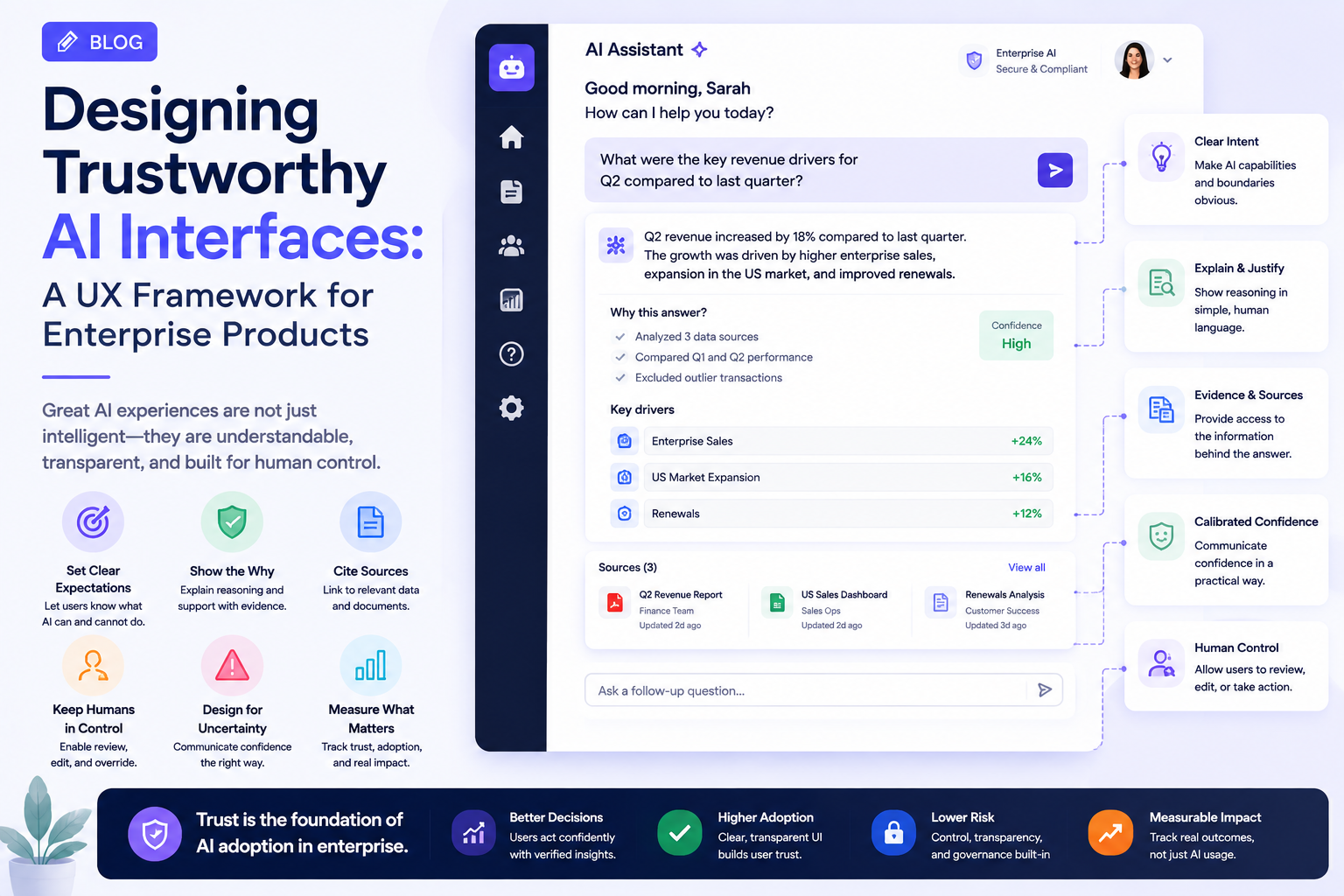
Users should know what an AI feature can and cannot do.
A button labeled “Ask AI” does not tell users enough.
The interface should communicate whether the system is:
- Generating content
- Summarizing information
- Searching company data
- Making a recommendation
- Taking an action
- Predicting an outcome
These distinctions matter because users may assign different levels of confidence to each capability.
An AI-generated summary and an AI-approved financial transaction should never feel equivalent.
Explain AI Without Overloading the User
Transparency does not mean exposing technical details.
Most users do not need to know which model generated an answer or how many parameters it contains.
They need practical context.
For example:
AI recommendation: Review this supplier because delivery delays increased 18% over the last three months.
The interface could provide:
Why this was recommended → Supporting data → Review details
This gives users enough information to evaluate the recommendation without forcing them to understand the underlying AI system.
Show Sources When They Matter
Enterprise AI frequently works with internal documents, databases, and knowledge repositories.
When an AI response is based on business information, the UX can provide access to relevant sources.
A useful structure is:
AI answer → Key evidence → Source documents → Detailed information
This is especially important when users make decisions based on generated content.
The interface should make it easy to move from a generated answer back to the information supporting it.
Confidence Should Be Designed Carefully
Confidence indicators can be useful, but they can also create false certainty.
A label such as:
98% confidence
may cause users to trust an output more than they should.
Instead, UX teams can communicate uncertainty in practical language.
For example:
“The available information suggests…”
or:
“This recommendation is based on three recent records.”
The goal is not to make every AI response appear uncertain.
It is to communicate uncertainty when it affects the user’s decision.
Keep Humans in Control of High-Impact Actions
AI can recommend actions without necessarily executing them.
For sensitive workflows, a useful interaction model is:
AI identifies → AI recommends → User reviews → User approves → System executes
This creates a clear boundary between intelligence and authority.
For lower-risk tasks, more automation may be appropriate.
The UX should therefore reflect the consequences of the action.
Design for AI Failure
AI systems will sometimes produce incorrect, incomplete, outdated, or irrelevant responses.
The interface needs to anticipate these situations.
Instead of simply displaying:
“Unable to answer.”
the product could explain:
“I couldn’t find enough information to answer this accurately.”
It could then offer:
- Try another question
- Search documents
- Contact an administrator
- Review available sources
Good failure UX prevents users from assuming that an AI system is broken when the real issue is insufficient information.
AI Interfaces Need Better Feedback States
Traditional applications usually have states such as:
Loading → Success → Error
AI-powered products often require more nuanced states:
Understanding request → Searching → Analyzing → Generating → Reviewing
These states can make AI interactions feel less mysterious.
However, they should accurately represent what the system is doing.
Artificially elaborate animations may look impressive but do little to improve understanding.
Avoid the “Chatbot Everywhere” Pattern
A conversational interface is not automatically the best interface for every AI feature.
If users need to approve an invoice, a structured approval screen may be better than a chatbot.
If users need to compare products, a visual comparison interface may be more effective than a conversation.
AI should therefore be integrated into the interaction pattern that best supports the user’s goal.
Enterprise UX research is increasingly pointing toward AI being embedded directly into the working surface rather than existing as a disconnected side feature.
Design Systems Must Evolve
Traditional design systems define:
- Buttons
- Forms
- Cards
- Tables
- Navigation
- Typography
AI products need additional patterns.
These may include:
- AI suggestions
- Generated content
- Confidence indicators
- Source citations
- Approval states
- AI activity indicators
- Human-review states
- AI error states
This makes the design system a foundation for consistent AI behavior rather than simply visual consistency.
Modern enterprise design systems are increasingly being treated as governance mechanisms that include accessibility, content standards, component rules, and consistency checks.
Accessibility Still Applies to AI
AI interfaces should remain usable with assistive technologies.
Teams should consider:
- Screen-reader announcements
- Keyboard interaction
- Focus management
- Text scaling
- Alternative representations of generated content
- Accessible status updates
Dynamic AI responses can create additional challenges because content may change after the user initiates an action.
The system needs to communicate those changes clearly.
Measure Trust, Not Just Usage
An AI feature can have high usage and still create a poor experience.
Product teams should measure:
- Recommendation acceptance
- Correction rates
- User overrides
- Repeated prompts
- AI abandonment
- Task completion
- Time saved
- User-reported confidence
The important question is not:
“How often do users interact with AI?”
It is:
“Does AI help users complete their work more effectively and confidently?”
Build a Trust Framework Before Scaling
Before expanding an AI feature across an enterprise product, UX teams can evaluate five areas:
| Area | Key Question |
|---|---|
| Clarity | Does the user understand what AI is doing? |
| Evidence | Can important outputs be verified? |
| Control | Can users override or reject AI decisions? |
| Recovery | What happens when AI is wrong? |
| Measurement | Can the team determine whether AI actually helps? |
This framework helps prevent AI from becoming an opaque layer inside an otherwise understandable product.
Industry Perspective
The enterprise product engineering landscape is increasingly connecting AI, UX, accessibility, design systems, and governance. Companies such as GeekyAnts have publicly shared work across AI and product engineering, reflecting the broader movement toward building AI capabilities around real workflows rather than treating AI as a standalone feature.
Conclusion
Trustworthy AI UX is not about making AI appear smarter.
It is about helping users understand what the system knows, what it is doing, why it produced an output, and when human judgment is still required.
For enterprise products, the strongest AI experiences will combine intelligent automation with clear evidence, meaningful feedback, user control, accessibility, and thoughtful failure handling.
The winning UX principle is simple:
Make AI powerful enough to help, but transparent enough to trust.