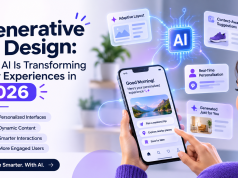


Artificial intelligence is becoming an important part of modern digital products. From personalized recommendations and intelligent search to automated decision-making and conversational assistants, AI is changing how users interact with applications.
However, introducing AI into a product creates a new UX challenge: users need to understand what the system is doing, why it is making certain recommendations, and how much control they have over its decisions.
An interface may look modern and offer powerful AI capabilities, but users can lose confidence when the system produces unexpected answers, makes unexplained recommendations, or performs actions without clear permission.
This is why trustworthy AI interface design is becoming an important part of product development in 2026. Designers must create experiences that communicate AI behavior clearly while keeping users informed and in control.
What Is Trustworthy AI Interface Design?
Trustworthy AI interface design is the practice of designing digital experiences that make AI-powered functionality understandable, predictable, transparent, and controllable.
It focuses on helping users understand the relationship between their inputs, the AI system’s outputs, and the actions that may follow.
For example, consider an AI-powered financial application that recommends reducing spending in a particular category.
A basic interface might simply display the recommendation.
A more trustworthy interface could explain:
- Which spending patterns influenced the recommendation.
- What period of financial activity was analyzed.
- Whether the recommendation is based on complete or limited information.
- How users can review or correct the underlying data.
- Whether any action will be taken automatically.
The difference is not necessarily the intelligence of the system. It is how effectively the interface communicates that intelligence.
Why Trust Is Important in AI UX Design
Traditional applications generally follow predefined rules and workflows. AI-powered products introduce additional uncertainty because their outputs may vary depending on user input, available data, and model behavior.
Designers need to address several user expectations.
1. Users Want to Understand AI Decisions
When an AI system recommends a product, summarizes information, or prioritizes tasks, users may want to know why that result appeared.
Providing relevant context can help users evaluate whether a recommendation makes sense.
2. Users Need Control Over Automated Actions
AI systems may suggest or perform actions on behalf of users. However, users should know which actions require approval and which operations can be reversed.
3. Transparency Reduces Confusion
Users should be able to distinguish between AI-generated content, verified information, and actions completed by the application.
4. Trust Supports Long-Term Product Adoption
An impressive first interaction does not guarantee continued usage. Consistent behavior, clear communication, and reliable recovery options help create a more dependable experience.
8 UX Principles for Designing Trustworthy AI Interfaces
1. Clearly Identify AI-Generated Content
Users should know when they are interacting with AI-generated information.
This can be communicated through labels such as:
- AI-generated summary
- Suggested response
- AI recommendation
- Automatically generated content
For example, an AI-powered customer support application should distinguish between a verified account status and a response generated by its assistant.
Clear labeling prevents users from assuming that every generated statement has been independently verified.
2. Explain Why Recommendations Appear
AI recommendations become more useful when users understand the information behind them.
Consider an eCommerce application that recommends a product.
Instead of displaying only “Recommended for you,” the interface could explain that the recommendation is based on previously viewed categories or selected preferences.
Explanations should be relevant and concise. Avoid overwhelming users with technical details that do not help them make decisions.
3. Communicate Uncertainty
AI systems can produce inaccurate, incomplete, or uncertain outputs.
Interfaces should avoid presenting every AI response as an established fact.
Useful design patterns include:
- Showing when information is incomplete.
- Providing confidence information when it is meaningful and validated.
- Highlighting missing details.
- Encouraging verification for high-impact decisions.
- Offering alternative results where appropriate.
A numerical confidence score should not be displayed simply to make an answer appear more reliable. It should have a clear interpretation and be supported by the underlying system.
4. Give Users Control Over AI Actions
Users should understand what an AI system can do independently and what requires permission.
For example, an AI scheduling assistant may suggest suitable meeting times, but creating or sending an invitation could require user confirmation.
Useful controls include:
- Approve
- Edit
- Reject
- Undo
- Regenerate
- Stop processing
These controls make AI interaction feel collaborative rather than unpredictable.
5. Design Clear AI Processing States
AI operations may take longer than conventional interface interactions.
A blank screen or generic loading spinner can make users wonder whether the application is working.
Instead, provide meaningful status information such as:
- Analyzing your request
- Retrieving relevant information
- Preparing recommendations
- Reviewing the results
Only show progress details that accurately reflect the system’s actual workflow. Do not imply that the AI is completing a particular operation when it is not.
6. Make Error Recovery Simple
AI interfaces should anticipate incorrect outputs, failed requests, and misunderstood instructions.
For example, if an AI assistant misunderstands a user request, it should allow the user to clarify the instruction without restarting the entire workflow.
Useful recovery options include:
- Try again
- Edit your prompt
- Provide additional information
- Report an incorrect result
- Connect with human support
Error messages should explain what happened and identify the next available action.
7. Respect Privacy and User Consent
AI products may process personal information, conversation history, documents, or behavioral data.
The interface should communicate what information is collected, why it is required, and how users can manage relevant permissions.
Design considerations include:
- Clear consent screens.
- Accessible privacy settings.
- Controls for personalization.
- Transparent data-sharing explanations.
- Appropriate options to delete or manage stored information.
Privacy information should be understandable rather than hidden inside lengthy technical policies.
8. Maintain Consistent Human-Centered Design
AI should improve the experience without making the interface unnecessarily complicated.
Keep navigation predictable, maintain familiar interaction patterns, and ensure that users can access important features without relying entirely on conversational prompts.
A well-designed AI interface should provide both intelligent assistance and conventional controls.
Trustworthy AI UX Patterns Across Different Industries
Different industries have different expectations around accuracy, privacy, and user control.
| Industry | AI functionality | Important UX consideration |
|---|---|---|
| Banking | Spending analysis and financial recommendations | Explain data sources and require approval for transactions |
| Healthcare | Information summaries and appointment assistance | Communicate limitations and support professional review |
| eCommerce | Product recommendations | Explain personalization and allow preference changes |
| Travel | Itinerary suggestions | Show availability details and confirm reservations |
| Education | AI learning assistance | Distinguish generated explanations from verified learning material |
| Enterprise SaaS | Task prioritization and workflow assistance | Show activity history and provide approval controls |
These examples demonstrate why a single AI interface pattern cannot work equally well for every product.
Common Mistakes in AI Interface Design
Hiding AI Limitations
Presenting AI-generated information as completely reliable can create unrealistic expectations.
Better approach: Communicate uncertainty and provide verification options where necessary.
Automating Too Much
Automatically performing sensitive actions can make users feel that they have lost control.
Better approach: Define clear permission boundaries and request confirmation for important operations.
Using Technical Language
Terms such as model inference, embeddings, and token processing may confuse ordinary users.
Better approach: Explain functionality in language that reflects the user’s task.
Making AI the Only Way to Navigate
Replacing conventional navigation with a chatbot can create unnecessary friction.
Better approach: Offer conversational assistance alongside familiar interface controls.
Ignoring Accessibility
Dynamic AI responses can create problems for screen readers, keyboard navigation, and users who need additional processing time.
Better approach: Test all generated states for accessibility and maintain predictable focus and navigation behavior.
How to Evaluate Trust in AI-Powered User Experiences
Trust should be evaluated through actual user behavior and feedback rather than visual design alone.
UX teams can measure:
- Task completion rate: Can users complete important tasks successfully?
- Correction rate: How frequently do users need to correct AI-generated results?
- Approval rate: How often do users accept or reject recommendations?
- Error recovery: Can users recover when the AI misunderstands a request?
- User confidence: Do users understand the limitations of the system?
- Privacy awareness: Do users understand what information is being processed?
- Repeat usage: Do users continue using AI features after their initial experience?
Usability testing should include successful interactions, incorrect outputs, ambiguous requests, and situations where the AI cannot complete the task.
The Future of Trustworthy AI UX Design
As AI becomes more deeply integrated into digital products, designers will need to focus increasingly on explainability, permission management, and human oversight.
Interfaces may become more adaptive and conversational, but users will still need understandable information, predictable controls, and clear ways to correct system behavior.
The role of UX designers will extend beyond arranging screens and defining interaction flows. They will also help establish how intelligent systems communicate, request permission, handle uncertainty, and build user confidence.
Final Thoughts
Trust is becoming a fundamental requirement for successful AI-powered products. An application should not simply demonstrate what artificial intelligence can do; it should help users understand and control how that intelligence affects their experience.
By designing clear explanations, meaningful permission controls, transparent AI states, and accessible recovery options, businesses can create products that are both intelligent and dependable.
The most effective AI interfaces will not be those that automate everything. They will be the ones that make complex technology easier to understand while keeping people involved in important decisions.