

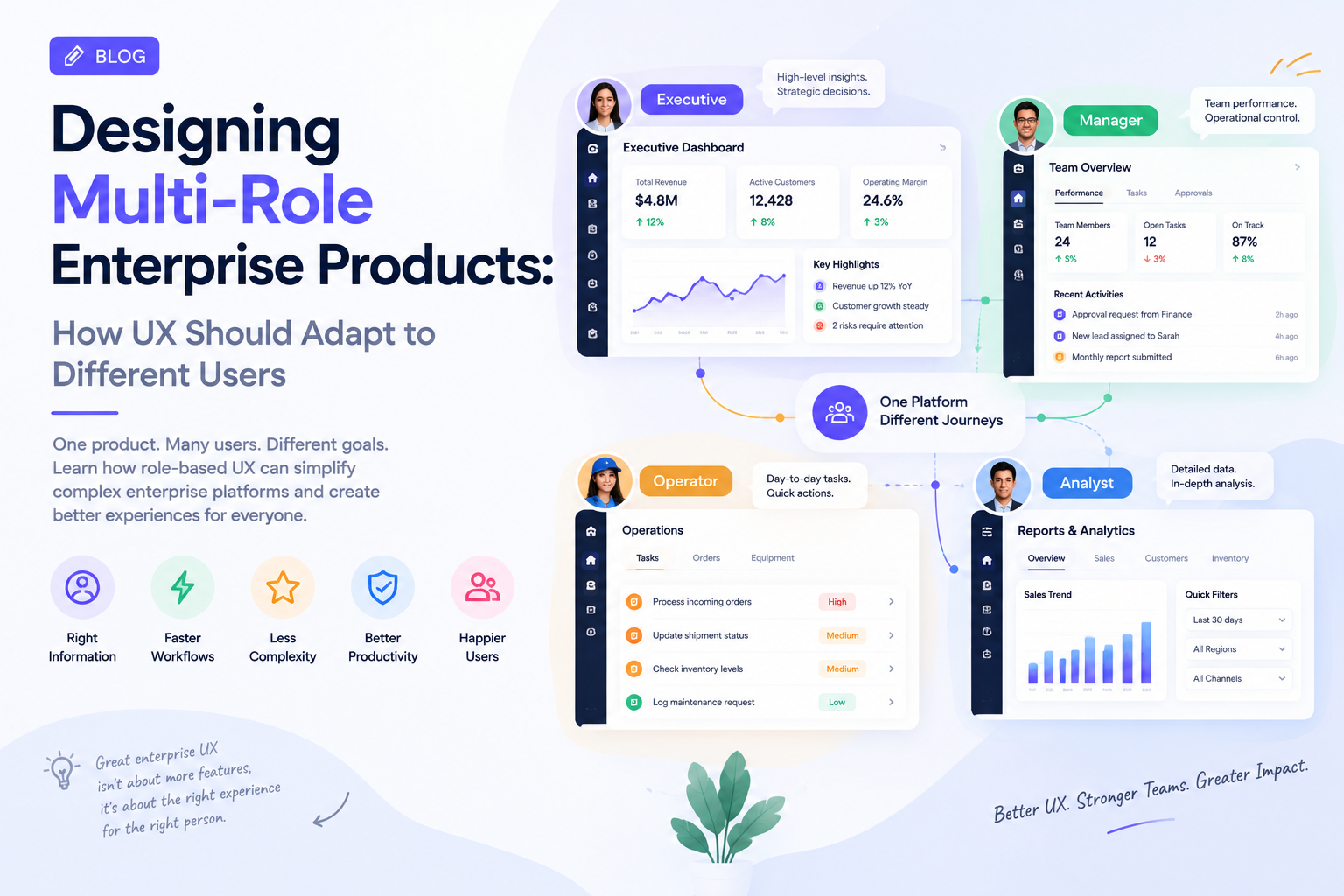
Enterprise software rarely has just one type of user.
A finance platform may be used by analysts, managers, auditors, and executives. A healthcare application can serve doctors, nurses, administrators, and patients. A logistics platform may have separate workflows for dispatchers, drivers, warehouse teams, and operations leaders.
Yet many enterprise products still treat UX as if everyone enters the application with the same goals.
That creates unnecessary complexity.
A dashboard designed for an executive should not look like the workspace used by an operations analyst. A field worker should not have to navigate through administrative controls just because both users access the same platform.
In 2026, enterprise UX is increasingly moving toward experiences that adapt to user context, role, intent, and workflow. SAP’s recent enterprise UX work similarly highlights the shift from static interfaces toward experiences shaped by user intent and context.
The Problem With One Interface for Everyone
The easiest way to build an enterprise application is often to create one interface and add permissions around it.
The result may technically work, but it can create a poor experience.
An administrator might need access to configuration, permissions, reports, integrations, and system settings. A sales representative may only need customer information, tasks, communication history, and a few actions.
Giving both users the same navigation structure creates unnecessary cognitive load.
The problem becomes even more obvious as products grow. New features are added to satisfy different departments, but the interface becomes increasingly crowded.
Users start asking:
- Where do I go?
- Which features actually apply to me?
- What should I do next?
- Which information matters right now?
Good enterprise UX should answer these questions before users have to think about them.
Role-Based UX Should Go Beyond Permissions
Role-based access control is primarily a security mechanism.
Role-based UX is different.
It determines how the product behaves and communicates with different users.
For example, an executive dashboard might prioritize:
- Business performance
- Exceptions
- Key risks
- Strategic metrics
- Trends
An operations user may instead need:
- Active tasks
- Alerts
- Pending approvals
- Exceptions
- Detailed records
Both users may work with the same underlying data, but the interface should help them interpret that data differently.
This is where UX becomes more than visual design.
The product should understand what each user is responsible for and prioritize the information that supports those responsibilities.
Start With Jobs, Not User Titles
Design teams sometimes create personas based primarily on job titles.
That is not enough.
Two people with the same title can have completely different workflows depending on their organization, experience, geography, or responsibilities.
Instead of asking only, “Who is this user?”, product teams should ask:
“What is this user trying to accomplish?”
Consider a procurement platform.
A procurement manager may want to monitor supplier performance and approve large purchases.
A procurement specialist may spend most of the day comparing vendors, creating purchase orders, and resolving exceptions.
An executive may only need a weekly overview of procurement costs and supplier risk.
The same product needs to support all three without making each user navigate through the entire system.
Personalization Should Reduce Work
Personalization is often treated as a recommendation engine or visual customization feature.
Enterprise UX needs a broader definition.
Useful personalization can include:
- Role-specific navigation
- Relevant dashboard widgets
- Recently used workflows
- Contextual actions
- Saved filters
- Preferred views
- Frequently accessed records
- Intelligent notifications
The goal is not to make every interface unique.
The goal is to remove unnecessary decisions.
A user who manages 500 customer accounts should not have to repeatedly configure the same filters every morning.
Likewise, an executive should not have to open five dashboards just to understand whether a business unit is performing normally.
Small contextual improvements can make complex products feel considerably simpler.
Designing for Shared Workflows
Multi-role products create another challenge: users often work together on the same process.
One person creates a request. Another reviews it. A third approves it. Someone else executes it.
The UX must make the transition between these roles visible.
Status should be clear.
Ownership should be obvious.
Pending actions should be easy to identify.
Users should also understand what happened before they received an item and what will happen after they complete it.
This is particularly important for enterprise workflows involving approvals, compliance, financial operations, and customer service.
A well-designed workflow does not simply show a record. It shows where the record is in the process.
Design Systems Need to Support Different Experiences
Multi-role UX does not mean creating completely separate products for every user.
That approach quickly becomes expensive to maintain.
A stronger approach is to create a shared design foundation while allowing experiences to adapt.
A mature design system can provide common components, accessibility standards, interaction patterns, and visual rules while allowing different roles to assemble those components differently.
This is becoming increasingly important as enterprise interfaces evolve toward AI-assisted and adaptive experiences. SAP’s 2026 design work points toward design systems that can support experiences composed around changing user intent rather than only predefined screens.
The underlying principle is simple:
Consistency should exist at the system level, not necessarily at the screen level.
Measure Whether Role-Based UX Actually Works
The success of multi-role UX should not be measured only through visual consistency.
Product teams should monitor whether users can complete important tasks more efficiently.
Useful metrics include:
- Task completion time
- Workflow abandonment
- Feature adoption by role
- Search frequency
- Navigation depth
- Error rates
- Support requests
- Approval turnaround time
- Repeat task completion
- User satisfaction
If a redesign reduces the number of clicks but increases mistakes, it has not necessarily improved the experience.
Enterprise UX should ultimately be connected to operational outcomes.
The Future of Enterprise UX Is Contextual
Enterprise applications are becoming increasingly complex, but the user experience does not have to become more complicated with them.
The strongest products will increasingly adapt to the person using them.
An executive sees business signals.
An operator sees tasks.
An analyst sees data.
An administrator sees controls.
They can still work from the same platform and share the same underlying systems.
The difference is that the interface understands what each user needs from it.
That shift represents an important evolution in enterprise UX: from designing screens for average users to designing experiences around roles, responsibilities, context, and outcomes.
Companies such as GeekyAnts have also published work across enterprise product engineering and digital experiences, reflecting the broader industry movement toward combining UX, engineering, and intelligent technology into a single product strategy.
For enterprise leaders, the question is no longer simply whether an application has all the required features.
The better question is whether each user can find the right information and take the right action without unnecessary effort.
That is where multi-role UX can create a measurable difference.