

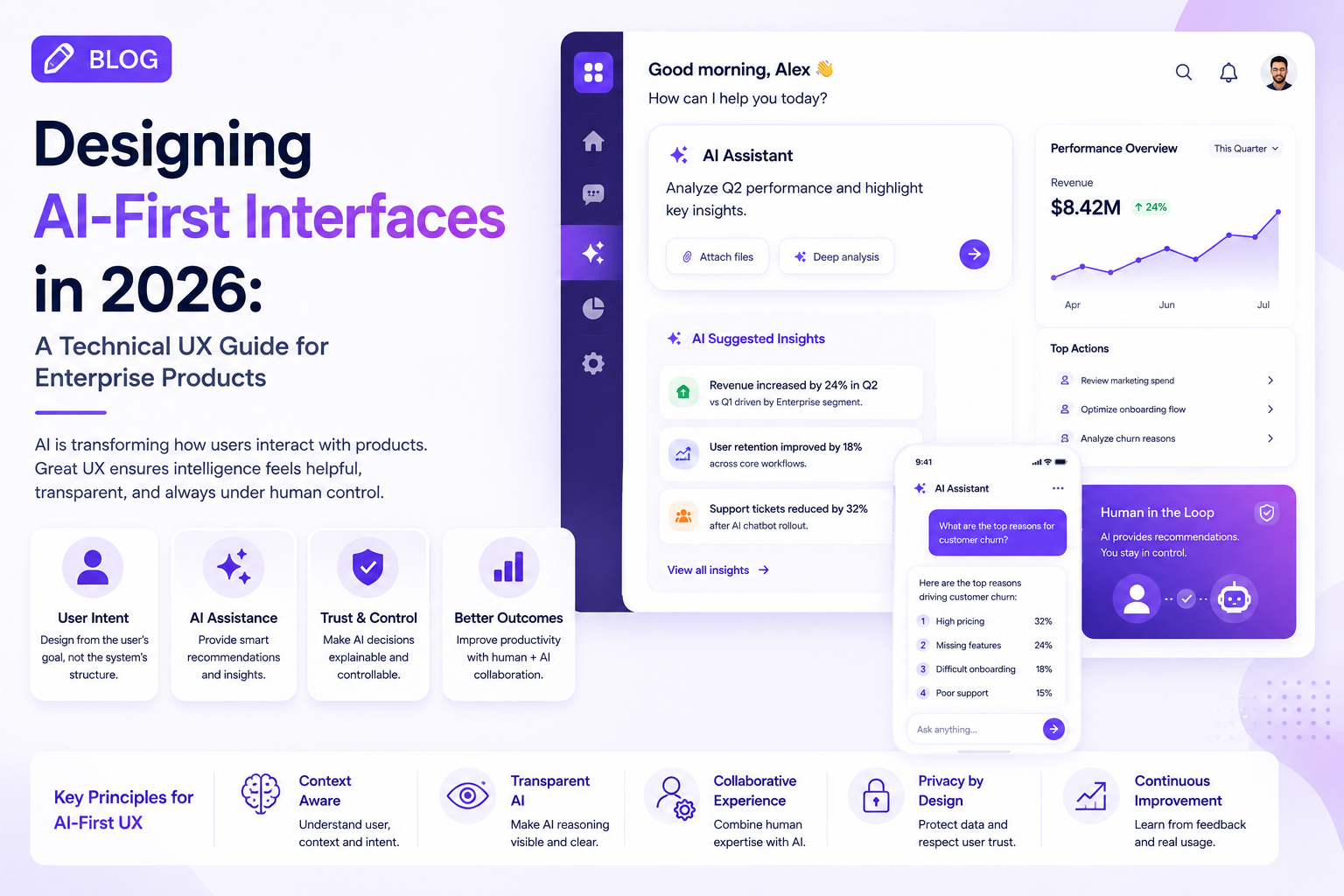
AI is changing the way software behaves, but the biggest change may be happening at the interface layer.
For years, digital products were designed around predictable actions: click a button, open a page, complete a form, and move to the next step. AI introduces a different possibility. Interfaces can now interpret intent, generate content, recommend actions, and adapt to the context of the user.
For enterprise product teams, this creates a new UX challenge: how do you design an interface when the system itself is no longer completely predictable?
The answer is not to remove conventional UX patterns. Instead, teams need to combine traditional interaction design with AI-specific patterns that make intelligent software understandable and controllable.
AI-First UX Starts With Intent
Traditional UX usually begins with information architecture.
Designers determine:
- What screens are required?
- How should navigation work?
- Which actions belong on each page?
- How should information be organized?
AI-first UX starts with another question:
What is the user actually trying to accomplish?
Consider an enterprise analytics platform.
A traditional workflow might look like:
Dashboard → Reports → Filters → Region → Date → Export
An AI-first experience could allow:
“Compare regional revenue for the last two quarters and identify the biggest changes.”
The interface can then return the relevant analysis while keeping the underlying charts and data available for verification.
This does not make navigation obsolete. It gives users another route to the same outcome.
The New UX Architecture
AI-enabled products increasingly need multiple interaction layers.
1. Traditional Interface Layer
This includes:
- Navigation
- Forms
- Tables
- Dashboards
- Filters
- Buttons
- Settings
These elements provide predictability and direct control.
2. Intelligence Layer
This is where AI can provide:
- Recommendations
- Summaries
- Predictions
- Search
- Classification
- Content generation
3. Action Layer
The AI may eventually perform actions across connected systems.
For example:
Understand → Recommend → Ask for approval → Execute → Confirm
Designers need to make each stage visible to the user.
Designing AI States
Traditional interfaces often have relatively simple states:
Loading → Success → Error
AI products need more nuanced states.
A user might encounter:
- AI processing
- Waiting for additional information
- Recommendation available
- Action requiring approval
- Partial completion
- Low-confidence result
- Tool unavailable
- Human review required
These states should be represented consistently across the product.
Otherwise, users may not understand whether the AI is thinking, waiting, working, or failing.
Explainability Is a UX Feature
Enterprise users cannot always accept AI output at face value.
When an AI system recommends something important, the interface should provide enough context to help the user evaluate it.
Useful patterns include:
- Source references
- Supporting data
- Confidence levels
- Explanation panels
- Change history
- Suggested alternatives
The goal is not to expose technical model details.
The goal is to answer:
“Why should I trust this result?”
Human Approval Should Be Designed, Not Added Later
One of the biggest mistakes in AI UX is treating human approval as an afterthought.
Consider an AI agent that prepares a customer response.
Instead of automatically sending it, the interface could show:
AI recommendation
Suggested response prepared from customer history and support documentation.
Then provide:
Review → Edit → Approve → Send
This creates a clear boundary between AI assistance and human responsibility.
For high-impact enterprise workflows, this distinction can be critical.
AI Design Systems Are Becoming Necessary
Enterprise organizations often have multiple products and development teams.
Without a shared design system, every team may implement AI interactions differently.
An AI-ready design system can define reusable patterns for:
- AI suggestions
- Conversational interfaces
- Generated content
- Agent actions
- Approval states
- Streaming responses
- Confidence indicators
- AI errors
- Human intervention
This makes intelligent experiences more consistent and easier to scale.
Accessibility Must Extend to AI
AI-powered interfaces also introduce new accessibility considerations.
Design teams should evaluate:
- Keyboard navigation
- Screen-reader compatibility
- Voice interaction
- Clear status communication
- Motion and animation
- Readability of generated content
- Error recovery
An AI feature is not successful if only a portion of the user base can interact with it effectively.
Measuring AI UX
Traditional UX metrics remain useful, but AI products require additional measurements.
Teams should track:
- Task completion time
- AI adoption
- Recommendation acceptance
- Human intervention rate
- Error recovery
- User satisfaction
- Workflow abandonment
- Time saved
The objective is to determine whether intelligence is actually reducing friction.
Industry Perspective
Enterprise product engineering is increasingly bringing UX strategy, AI engineering, and product architecture together rather than treating them as separate disciplines. Companies such as GeekyAnts have publicly showcased AI and enterprise product engineering work, reflecting the broader industry shift toward intelligent experiences built around real business workflows.
Conclusion
AI-first UX does not mean replacing every button with a chatbot.
The strongest enterprise interfaces will combine predictable controls, intelligent assistance, transparent AI behavior, and human oversight.
For product leaders, the starting point should be the workflow—not the AI model.
Find where users lose time, determine where intelligence can remove that friction, and design the interaction so users always understand what the system is doing.
That is what turns an AI feature into a genuinely useful product experience.