

Enterprise applications have traditionally been designed around menus, dashboards, tabs, and fixed workflows. That structure worked when software mainly provided users with information and required them to navigate manually between functions.
That model is beginning to change.
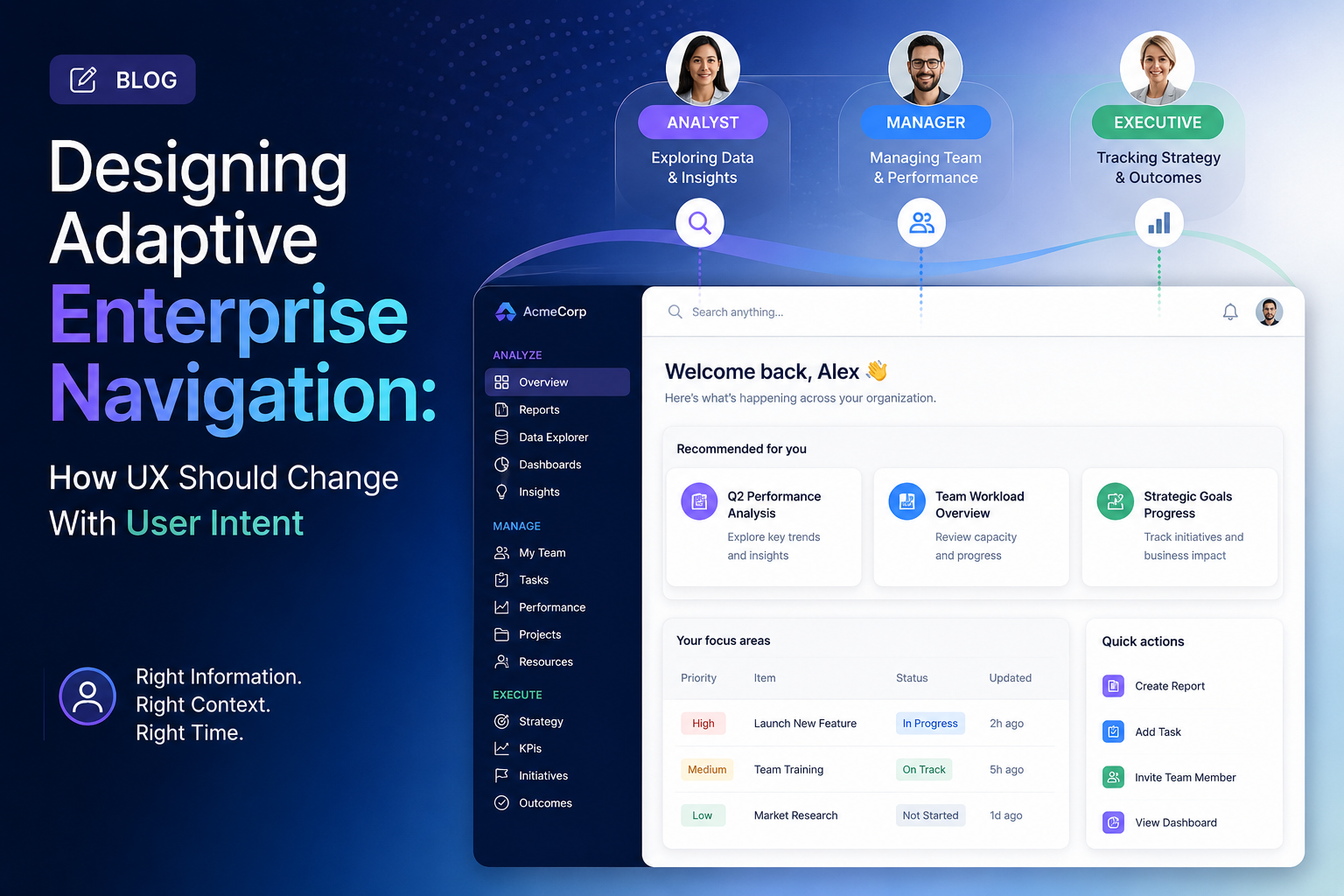
AI is increasingly becoming part of the enterprise interaction layer. Instead of forcing users to search through multiple screens, modern products can surface relevant actions, information, and workflows based on context and intent. SAP’s 2026 enterprise UX research similarly highlights the shift from predefined screens toward experiences that can adapt around user intent, context, and data.
For enterprise product teams, this creates a new UX challenge:
How should navigation work when every user may need a different path through the same product?
The answer is not to eliminate navigation. It is to make navigation more adaptive without sacrificing consistency, discoverability, or user control.
Why Traditional Enterprise Navigation Is Under Pressure
Many enterprise products have accumulated navigation over years.
A single application might contain:
- Dozens of modules
- Multiple administrative areas
- Reporting dashboards
- Approval workflows
- Search tools
- Notifications
- Data management screens
- AI-powered features
- Configuration settings
The result is often a navigation system designed around the organization’s internal structure rather than the user’s actual job.
A finance executive, for example, may care about exceptions, forecasts, and approvals. A finance analyst may spend most of the day inside reports and transaction workflows.
Both users may technically need access to the same application, but their priorities are completely different.
A static navigation structure treats them similarly.
An adaptive experience recognizes the difference.
This is becoming increasingly important as enterprise software moves toward AI-assisted workflows. Research from SAP and Bttr. points toward enterprise UX becoming more deeply integrated with operational workflows rather than functioning simply as a collection of screens.
Design Around Intent, Not Just Features
The first step toward adaptive navigation is changing the design question.
Instead of asking:
“Where should this feature live?”
Product teams should ask:
“What is the user trying to accomplish?”
Consider an enterprise procurement platform.
A traditional structure might contain:
Dashboard → Procurement → Suppliers → Contracts → Purchase Orders → Reports.
But a user arriving with the goal of “review suppliers with increased risk this quarter” shouldn’t necessarily have to navigate through four separate areas.
The interface could identify the intent and surface:
- Relevant suppliers
- Risk indicators
- Recent changes
- Related contracts
- Recommended actions
- Supporting reports
The underlying information architecture remains important, but the experience becomes more task-oriented.
This doesn’t mean replacing conventional navigation with an AI chatbot.
Instead, the strongest approach combines stable navigation with contextual shortcuts and intelligent discovery.
The New Role of the Design System
Adaptive interfaces create another challenge: consistency.
If interfaces can change dynamically, designers cannot simply create a new screen for every possible user scenario.
Design systems therefore need to become more flexible.
Components should have defined behavioral rules, states, accessibility requirements, and interaction patterns that allow them to be assembled according to context.
For example, a design system might define:
- How an AI recommendation appears
- How confidence is communicated
- How an alert becomes an actionable task
- How users review AI-generated information
- How recommendations can be dismissed
- How users return to the original workflow
This allows product teams to create experiences that feel personalized without creating an inconsistent interface.
SAP describes this direction as a move toward more compositional design systems capable of supporting AI-driven experiences.
The important distinction is that adaptive UX should not mean unpredictable UX.
Users should understand where they are, what changed, and how to get back.
Personalization Needs Boundaries
Personalization is attractive, but excessive personalization can create usability problems.
If an application constantly rearranges itself, users may struggle to build familiarity.
Enterprise users often develop muscle memory. They know where a report lives, where an approval button appears, and how to complete repetitive tasks.
A better approach is progressive adaptation.
The core structure remains stable while the interface adds contextual improvements around it.
For example:
Stable
- Primary navigation
- Account controls
- Search
- Core workflows
- Accessibility controls
Adaptive
- Recommended actions
- Frequently used tools
- Relevant alerts
- Recently accessed information
- AI-generated summaries
- Contextual shortcuts
This gives users the benefits of personalization without forcing them to relearn the application.
Designing for AI-Assisted Navigation
AI can make navigation more useful, but it introduces another responsibility: explainability.
If an application recommends a particular report or action, users should understand why it appeared.
A simple pattern might be:
Recommended for you
“Review three supplier contracts that changed significantly this week.”
The user can then see:
- Why it was recommended
- What information was used
- When the information was updated
- What action is available
This becomes particularly important in high-stakes enterprise environments.
UX research increasingly emphasizes trust, ethical guardrails, and measurement as AI becomes embedded into enterprise software.
Companies such as GeekyAnts have also publicly explored AI product engineering and enterprise AI workflows, reflecting the broader movement toward interfaces where intelligence is integrated directly into operational products rather than treated as a separate feature.
Measuring Whether Adaptive UX Actually Works
Adaptive navigation should not be evaluated simply by how sophisticated it looks.
Product teams should measure whether users accomplish important tasks more effectively.
Useful metrics include:
- Task completion time
- Navigation depth
- Search-to-action conversion
- Workflow abandonment
- Repeated navigation errors
- Feature discovery
- User correction rates
- Accessibility performance
- Adoption of recommended actions
For AI-assisted navigation, teams can also measure:
- Recommendation acceptance
- Recommendation rejection
- User overrides
- AI-related errors
- Time saved per workflow
The goal is not maximum personalization.
The goal is less unnecessary navigation and better task completion.
A Practical Framework for Enterprise Teams
Before redesigning enterprise navigation, product leaders can evaluate each major workflow through five questions:
- What is the user’s primary intent?
- Which information is required to complete that intent?
- Which steps are genuinely necessary?
- Which steps can be surfaced contextually?
- Where must users retain explicit control?
This creates a useful balance between intelligent assistance and predictable product behavior.
The future of enterprise UX is unlikely to be completely screenless or completely conversational.
Instead, successful products will combine structured navigation with contextual intelligence.
The interface will remain familiar enough to trust while becoming flexible enough to respond to what users are actually trying to accomplish.
That shift could become one of the defining UX principles of enterprise software over the next several years.